Get paid for LLK Sales gigs
Pricing
Light entrepreneur
3.00 % service fee
Incl. Truster Turva
*) The Truster Turva service includes accident, liability and legal expenses insurance. The optional Maksuvahti add-on costs €1.99 / invoice. It protects your receivables throughout their entire lifecycle, from sending the invoice to receiving payment. Please note: this partner pricing applies only to LLK Sales invoices.
Why Truster
Tax card
Once you've completed identification, we always fetch your tax card automatically from the Tax Administration's system, so you don't need to send it to us separately. Sole proprietorships (FIE) don't use a wage income tax card — instead, taxes are paid as prepayment tax (advance tax).
Payslip
As a light entrepreneur, your payslips are generated automatically in the Truster app whenever you're paid. You'll find them under Payments. As a sole proprietor (FIE), you'll find your company's transactions and reports in the app instead.
Additional payment services
With HetiPalkka, you get your pay into your account even before your business customer has paid the invoice. Pikamaksu, on the other hand, ensures you get paid outside our normal payment schedules.
Here's how to get started
- 01
Download the Truster app
You'll find the app in the App Store and Google Play. You can also use Truster on your computer.
- 02
Log in
Always use the same login method going forward. Please note: we may create a profile for you using information provided by our partners.
- 03
Verify your identity
Verify your identity with online banking credentials or a mobile certificate.
- 04
Respond to the PEP declaration
Confirm your PEP status (politically exposed person) on the home screen.
- 05
Add your details
Remember to add your name, phone number, email and home address.
- 06
Add your account number
Go to "Bank account" in the menu and add your account number.
- 07
Your profile is ready
Once these steps are done, your profile is ready and you can start invoicing for your work!
- 08
Becoming a sole proprietor (FIE)?
Want to order the sole proprietorship (FIE) service? You can order it from the "Order" section of the menu.
Watch the video to see how to get started as a light entrepreneur.
Frequently asked questions
When do I get paid for gigs?
Truster creates invoices on your behalf based on information received from the client, so you don't need to create or send an invoice yourself. Your pay is transferred to your account once the client has paid the invoice to Truster and you've confirmed the required information in the app for the work period. If you'd like, you can speed up your payment with the HetiPalkka service.
Can I choose which gigs I take on myself?
Yes. You work as an independent contractor, so you decide for yourself which gigs to accept. Truster acts as an invoicing and payment service and doesn't determine your shifts or gigs. You agree on the availability, schedules and content of gigs directly with the client.
What does Truster Turva cover during gigs?
The service includes Truster Turva, which covers accident, liability and legal expenses insurance during gigs. You'll find detailed information on coverage, compensation limits and how to file a claim on the Truster Turva pages: - Light entrepreneurs - Sole proprietors (FIE)
Why can't I see an expense invoice in my profile, or why haven't I been paid?
If you don't see an expense invoice template for adding expenses in your profile, even though we've gone through your profile details together, there are two common reasons for this, depending on whether you work as a light entrepreneur or a sole proprietor (FIE): 1. You've logged in with the wrong details (duplicate profile) If you invoice as a light entrepreneur, the first expense invoice appears in your profile with a slight delay, once we've received your information from the client. It's very important that you always log in using the same method you used when your profile was created. If you log in a different way, the system creates a new, empty profile where the expense invoice won't appear. In this case, you also can't be paid for a previously created invoice if the original profile is missing information. What do I do if I have a duplicate profile? No worries! Contact Truster customer service through the Support Requests section of the app. Our customer service team can easily merge duplicate accounts and move invoices to the correct profile. 2. You invoice as a sole proprietor (FIE) If you work as a sole proprietor (FIE), separate expense invoices are no longer created in your profile for adding expenses. Instead, you can add your expenses directly to your bookkeeping conveniently using the app's receipt scanner.
I don't have a gig ID to add expenses
When adding tax-deductible expenses, you can add a separate gig ID or other brief description to the expense note. Work done for LLK Sales may not always generate a separate gig ID, so you can simply write a short description of how the expense relates to the work you performed, so we can take it into account when processing your payment.
Where can I get help if I have questions?
For questions about the gigs themselves and the content of the work, please contact the client's support directly. For questions about invoicing, payments, expenses or the app, the best way to reach Truster customer service is through the Support Requests section of the app.
Guides
Sales location rental receipts
In your work for LLK Sales, you may accumulate receipts for sales location rentals. Submit the receipts via the Support Requests section of the Truster app well before the end of the work period, so we can add them on your behalf as expenses to be invoiced from the client. You can add other tax-deductible expenses to the draft invoice during the work period.
Pricing for light entrepreneurs
Partnership pricing and other fees: • Service fee 3.00% (incl. Truster Turva) • Health insurance contribution 1.91% → More information here • Optional Payment Guard 1.99 € → More information here We also withhold advance tax on your fee according to your salary income tax card, as well as any YEL insurance payment, if you have taken out YEL insurance with Ilmarinen through us. You can find our standard price list here.
Creating and sending invoices
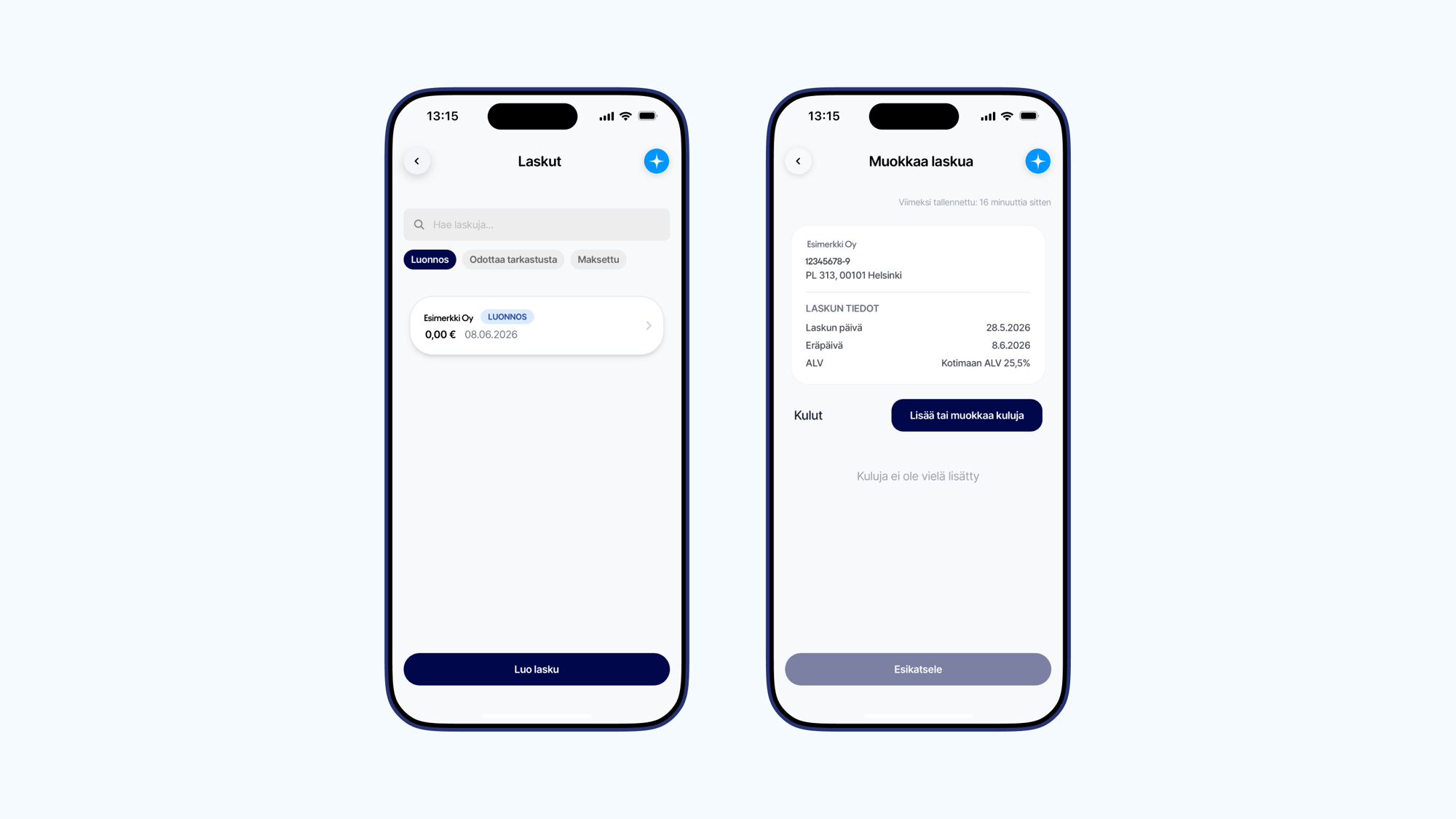
A draft invoice for adding expenses arising from partner assignments first appears in your profile with an amount of 0.00 €. Once we receive the billing data from the client, we automatically combine the fee information with the draft invoice details. An invoice with a total amount is then created in your profile, and you can track its status via the app. This means you don't need to create or send invoices for these assignments yourself. How do I create an invoice for another assignment? If you also carry out other assignments for which you create your own invoices, you can easily create invoices directly in the Invoices section of the app. You can find more detailed instructions for creating other invoices here.
How to add expenses as a light entrepreneur
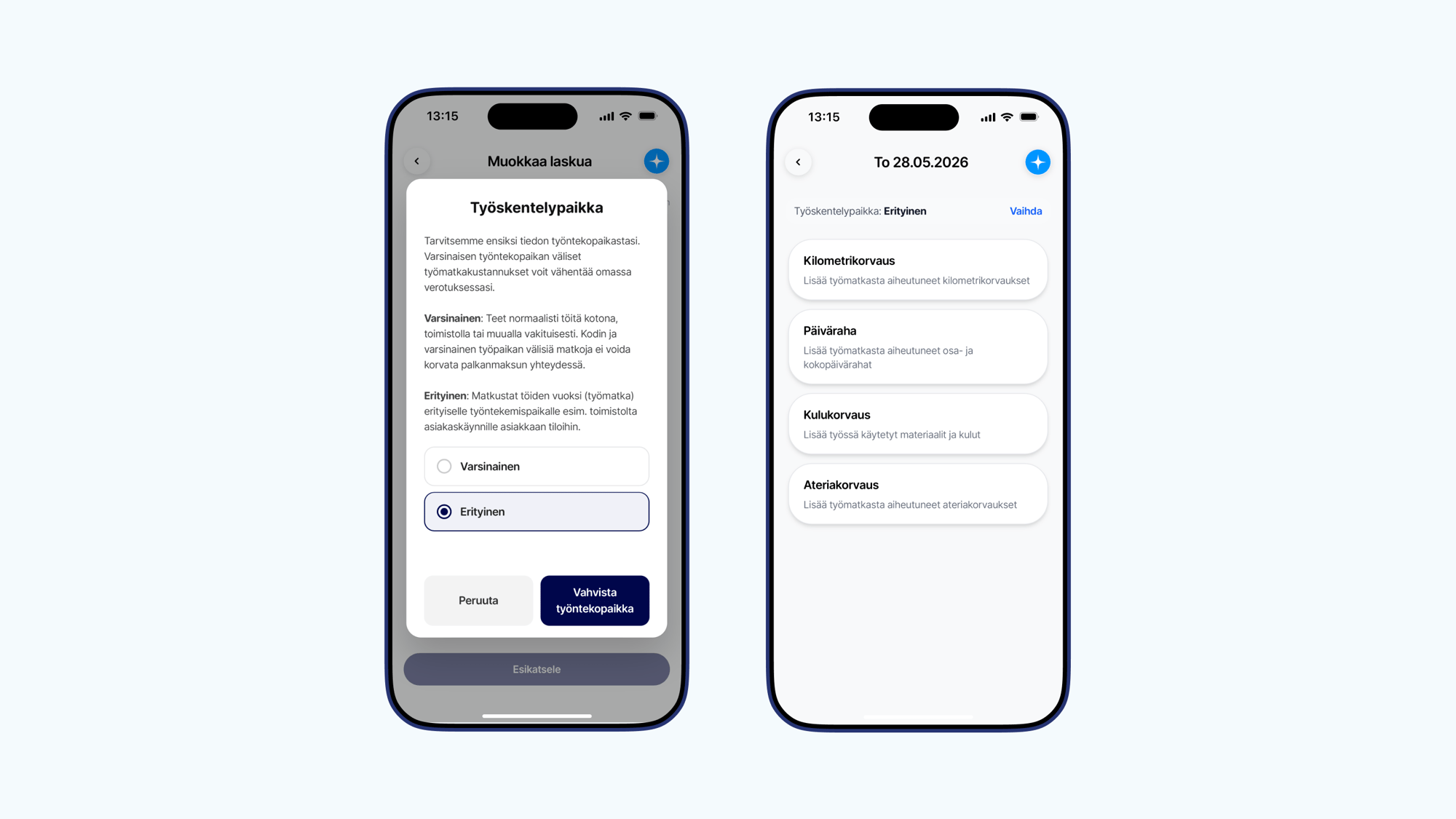
Truster creates invoices on your behalf based on information received from the client, so you don't need to create or send an invoice yourself. Your task is simply to add your own travel expenses and reimbursements to the ready-made draft invoice in your profile during the work period, if you want them to be tax-free when your fee is paid. By adding travel expenses to the draft invoice, you ensure that you receive the tax-free reimbursements you are entitled to right away when your fee is paid, meaning you keep more money in hand! Expenses accounted for at the time of fee payment do not need to be reported separately to the Tax Administration. Please note that fuel, charging, or material costs cannot be added to the invoice as tax-deductible expenses for light entrepreneurs. You can add these as income-generating expenses on your own personal tax return instead. The video covers the following topics: • 1:45 Adding mileage allowances • 3:19 Adding per diems • 5:42 Adding expense reimbursements 1. Start from the invoice Open the Truster app and go to the draft invoice you want to add expenses to in the Invoices section. Select Add row and then Add or edit expenses. 2. Choose the place of work When adding expenses for completed assignments, set the place of work as Special. If you work regularly at the same location, such as at home or at an office, that counts as your primary workplace. In that case, trips between home and the workplace are usually not reimbursed. Finally, check the expenses See the expense-specific instructions below. Once all expenses have been added, check the details and make sure all expenses are included. You don't need to send the invoice yourself — we will match the expenses to the correct assignment once we receive the billing information from the client.
What is light entrepreneurship
Light entrepreneurship is a form of work that allows a private individual to invoice for their own expertise without having their own business ID or having to set up a company. A light entrepreneur finds their own clients and agrees on the content and price of the work, but invoicing is handled through a billing service. Light entrepreneurship is especially suitable for those who want to try entrepreneurial-style work easily and flexibly.
Adding a receipted expense reimbursement as a light entrepreneur
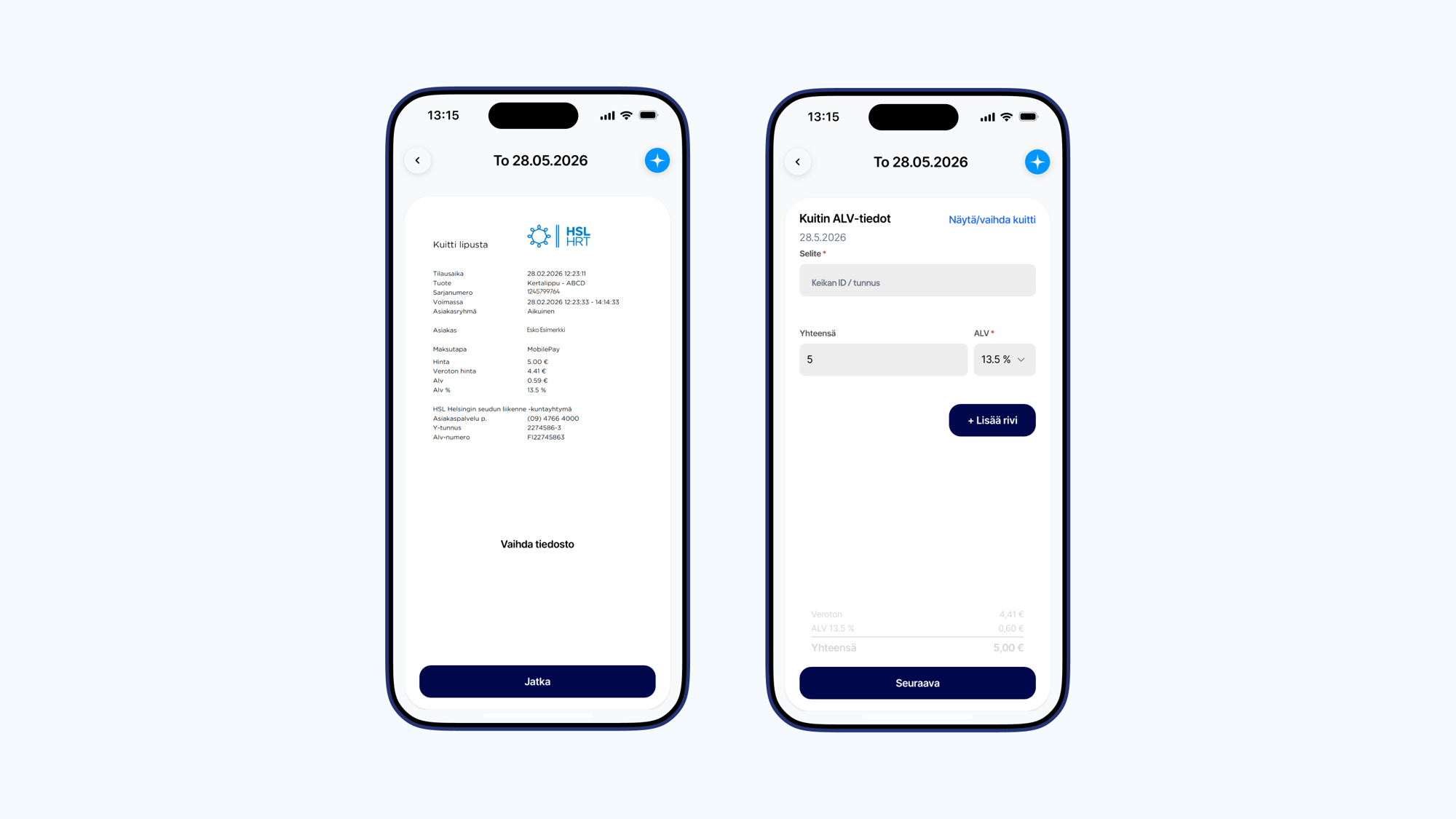
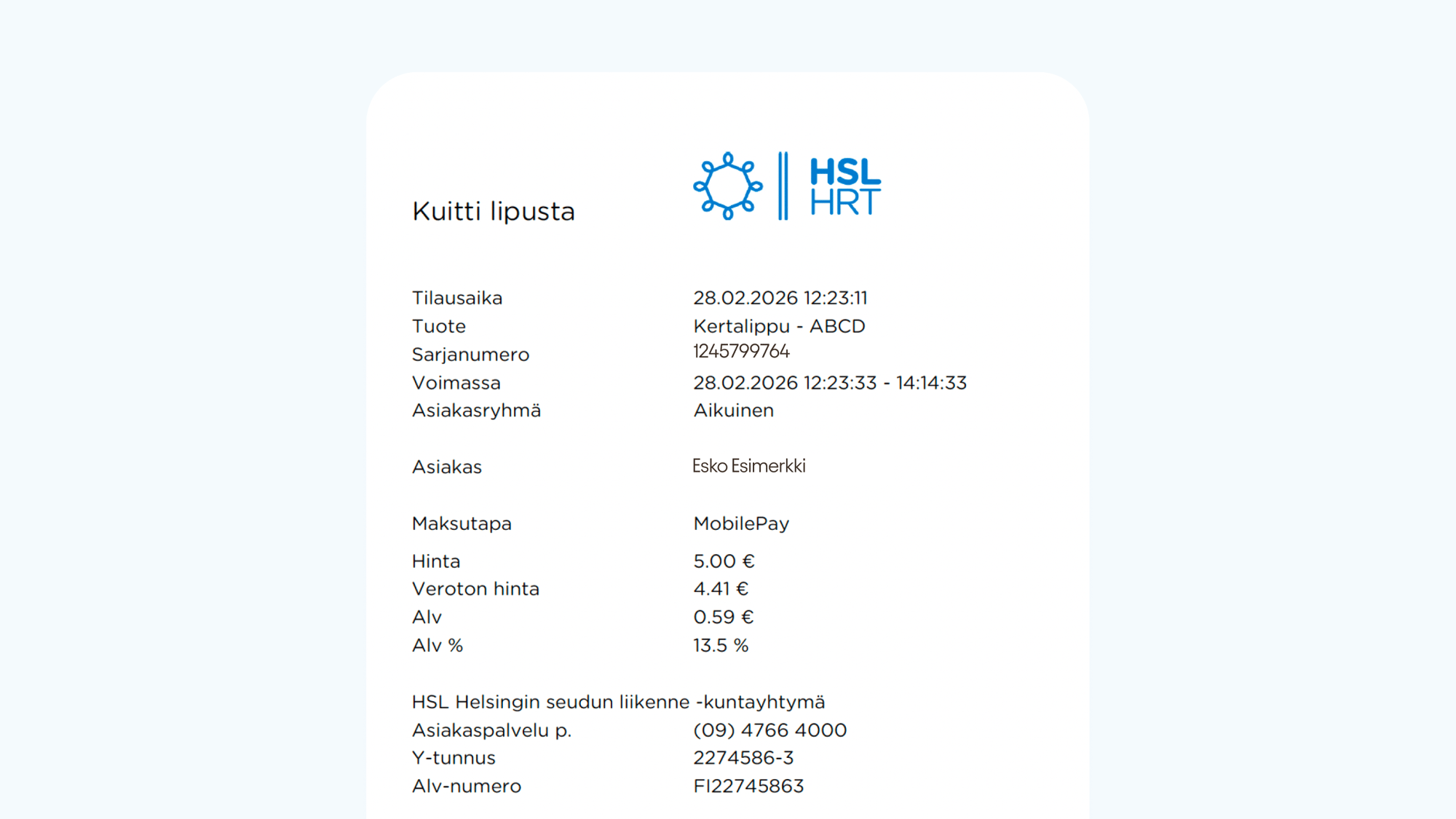
First, choose the date for which you want to add the expense. Then select Expense reimbursement. Add the receipt • take a photo of the receipt or upload a file • enter the expense amount • add the VAT details as shown on the receipt Domestic purchases: add the total amount and the VAT shown on the receipt Foreign purchases: add the amount in euros and VAT 0% Add a description Include the assignment ID / reference that the expense relates to in the expense description. Acceptable receipt Make sure you add an acceptable receipt to the deductions. An acceptable receipt includes: • seller's details (company name and business ID) • price breakdown • amount of VAT • date
Adding a per diem as a light entrepreneur
If your work trip entitles you to a per diem, select Per diem and fill in: • the start and end time of the trip • the destination address • transit addresses, if you changed location Include the assignment ID / reference that the per diem relates to in the description. Please note that the departure address is automatically taken from the home address in your profile, so you only need to add the destination address. Please make sure your home address is up to date in the My Details section.
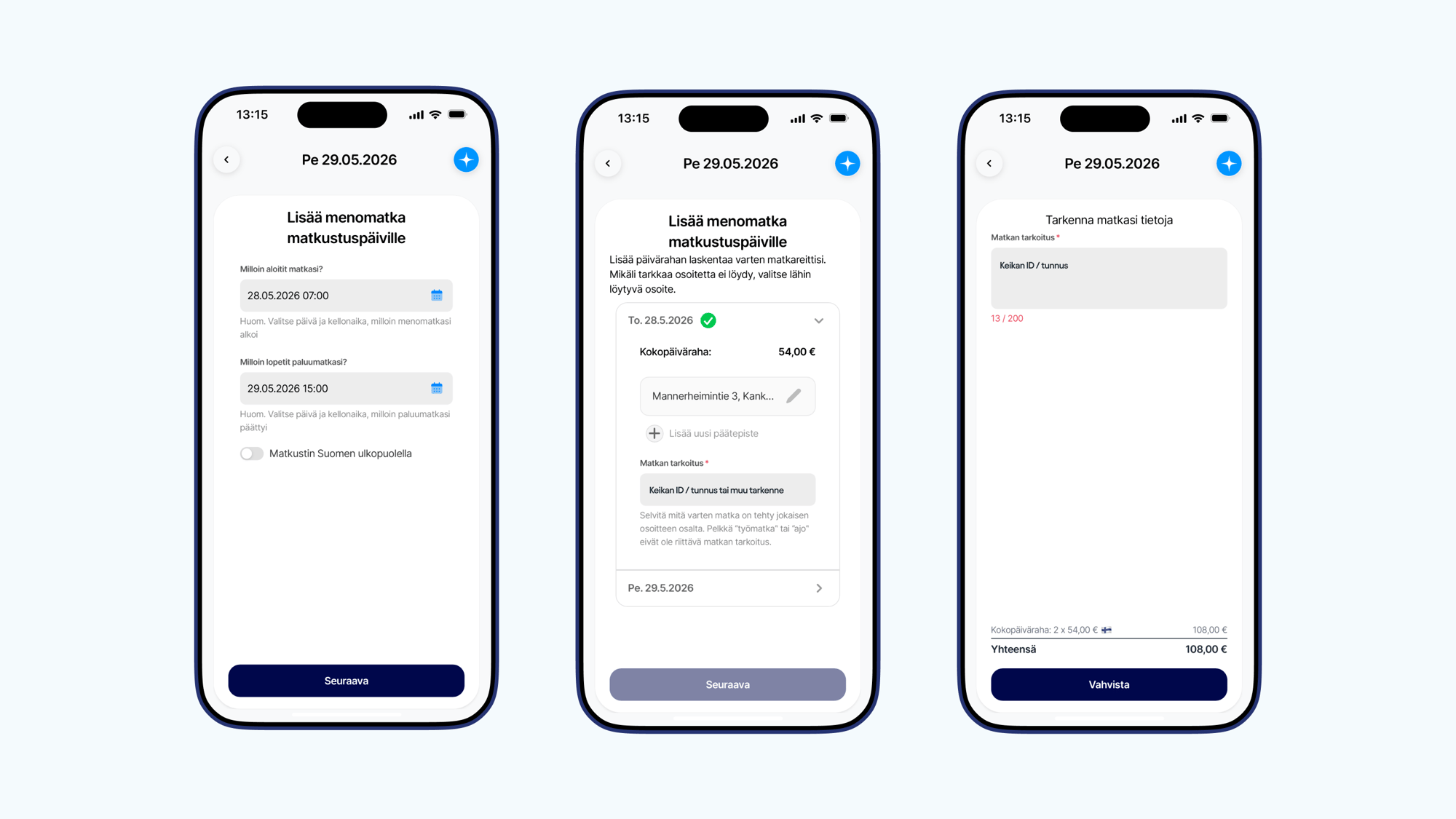
Adding a mileage allowance as a light entrepreneur
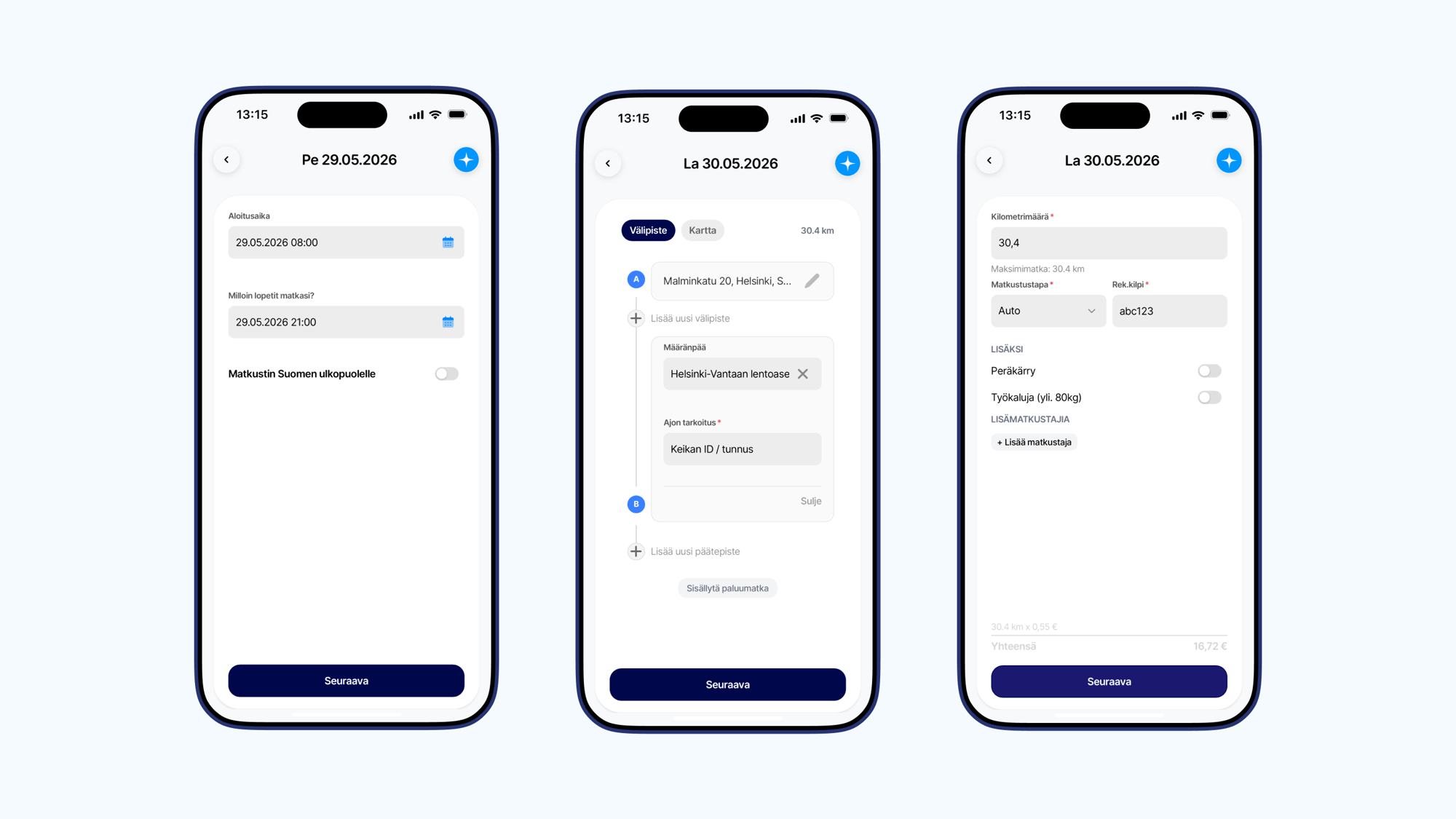
Select Mileage allowance and fill in: • start time • end time • departure address • destination • purpose of the trip (assignment ID / reference) • vehicle details If the trip had several stops, add them to the route. If you returned to the starting point, select Include return trip. If traveling by car, also add the license plate number.
Pay in your account right away
With Pikamaksu, your net pay lands in your account the moment the invoice is paid.
Illustration: a user selects Pikamaksu, so their net pay is paid into their account immediately after the invoice is paid.
Ready to start invoicing your LLK Sales gigs?
Sign up and get started in minutes.