Get paid for your Bahn Express gigs
Pricing
Light entrepreneur
3.00% service fee
Truster Turva*
Sole proprietorship
3.00% service fee
+ Truster Turva 0.5%
*) The Truster Turva service includes accident, liability and legal expenses insurance. For light entrepreneurs, Turva is included in the partnership pricing. In the Truster Pro Light sole proprietorship service, Truster Turva costs 0.5%. The optional Maksuvahti service costs €1.99 per invoice. It protects your receivables throughout their entire lifecycle, from sending the invoice to receiving payment. Note! The partnership pricing applies only to Bahn Express invoices.
Invoicing period: 06.08.–12.08.2026 / Record expenses by: 12.08.2026 / Payment date: 17.08.2026
Invoicing period: 13.08.–19.08.2026 / Record expenses by: 19.08.2026 / Payment date: 24.08.2026
Invoicing period: 20.08.–26.08.2026 / Record expenses by: 26.08.2026 / Payment date: 31.08.2026
Invoicing period: 27.08.–02.09.2026 / Record expenses by: 02.09.2026 / Payment date: 07.09.2026
Invoicing period: 03.09.–09.09.2026 / Record expenses by: 09.09.2026 / Payment date: 14.09.2026
Invoicing period: 10.09.–16.09.2026 / Record expenses by: 16.09.2026 / Payment date: 21.09.2026
Invoicing period: 17.09.–23.09.2026 / Record expenses by: 23.09.2026 / Payment date: 28.09.2026
Invoicing period: 24.09.–30.09.2026 / Record expenses by: 30.09.2026 / Payment date: 05.10.2026
Invoicing period: 01.10.–07.10.2026 / Record expenses by: 07.10.2026 / Payment date: 12.10.2026
Invoicing period: 08.10.–14.10.2026 / Record expenses by: 14.10.2026 / Payment date: 19.10.2026
Invoicing period: 15.10.–21.10.2026 / Record expenses by: 21.10.2026 / Payment date: 26.10.2026
Invoicing period: 22.10.–28.10.2026 / Record expenses by: 28.10.2026 / Payment date: 02.11.2026
Invoicing period: 29.10.–04.11.2026 / Record expenses by: 04.11.2026 / Payment date: 09.11.2026
Invoicing period: 05.11.–11.11.2026 / Record expenses by: 11.11.2026 / Payment date: 16.11.2026
Invoicing period: 12.11.–18.11.2026 / Record expenses by: 18.11.2026 / Payment date: 23.11.2026
Invoicing period: 19.11.–25.11.2026 / Record expenses by: 25.11.2026 / Payment date: 30.11.2026
Invoicing period: 26.11.–02.12.2026 / Record expenses by: 02.12.2026 / Payment date: 07.12.2026
Invoicing period: 03.12.–09.12.2026 / Record expenses by: 09.12.2026 / Payment date: 14.12.2026
Invoicing period: 10.12.–16.12.2026 / Record expenses by: 16.12.2026 / Payment date: 21.12.2026
Invoicing period: 17.12.–23.12.2026 / Record expenses by: 23.12.2026 / Payment date: 28.12.2026
Invoicing period: 24.12.–30.12.2026 / Record expenses by: 30.12.2026 / Payment date: 04.01.2027
Why Truster
Tax card
Once you've completed identification, we always fetch your tax card automatically from the Finnish Tax Administration's system, so you don't need to send it to us separately. Sole proprietors don't use a wage tax card — instead, taxes are paid as advance tax.
Pay slip
A light entrepreneur's pay slips are always generated in the Truster app when payment is made. You'll find them under Pay. As a sole proprietor, you'll find your business transactions and reports in the app instead.
Additional payment services
With HetiPalkka, you get your pay into your account even before your business customer has paid the invoice. Pikamaksu, on the other hand, ensures payment outside our normal payment schedule.
How to get started
- 01
Download the Truster app
You'll find the app in the App Store and Google Play. You can also use Truster on a computer.
- 02
Log in
Always use the same login method going forward. Note! We may create a profile for you using information received from our partners.
- 03
Verify your identity
Verify your identity using your online banking credentials or mobile ID.
- 04
Respond to the PEP declaration
Confirm your PEP status (politically exposed person) on the home screen.
- 05
Add your details
Remember to add your name, phone number, email and home address.
- 06
Add your account number
Go to "Bank account" in the menu and add your account number.
- 07
Your profile is ready
Once these steps are done, your profile is ready and you can start invoicing for your work!
- 08
Becoming a sole proprietor?
Want to sign up for the sole proprietorship service? You can order the service from the "Order" section of the menu.
Watch the video to see how to get started as a light entrepreneur.
Frequently asked questions
When will I get paid for gigs?
Truster creates invoices on your behalf based on the information received from the client, so you don't need to create or send the invoice yourself. Your pay is transferred to your account once the client has paid the invoice to Truster and you've confirmed the required details in the app for the work period. If you'd like, you can speed up your payment with the HetiPalkka service.
Can I choose which gigs I accept?
Yes. You work as an independent contractor, so you decide for yourself which gigs to accept. Truster works as an invoicing and payment service and doesn't determine your shifts or gigs. You agree directly with the client on the gigs offered, schedules and content.
What does Truster Turva cover during gigs?
The service includes Truster Turva, which covers accident, liability and legal expenses insurance during gigs. You'll find detailed information on insurance coverage, compensation limits and how to file a claim on the Truster Turva pages: - Light entrepreneurs - Sole proprietors
Why don't I see an expense invoice in my profile, or why haven't I been paid?
If you don't see an expense invoice template in your profile for adding expenses, there are two common reasons for this, depending on whether you're working as a light entrepreneur or a sole proprietor: 1. You've logged in with the wrong details (duplicate profile) If you invoice as a light entrepreneur, an expense invoice is generated in your profile once we've received your details from the client. If you don't yet have a Truster account, it's possible we've automatically created a profile for you based on this information. It's very important that you always log in to the service using the same login method. Log in with the email address or phone number you gave to the client. If you log in a different way, the system will create a new, empty profile for you where the expense invoice won't appear. In this case, you also may not have been paid for an invoice created earlier, if information is missing from the original profile. What do I do if I have a duplicate profile? No worries! Contact Truster's customer service through the Support Requests section of the app. Our customer service can easily merge duplicate accounts and move invoices to the correct profile. 2. You invoice as a sole proprietor If you work as a sole proprietor, separate expense invoices are no longer generated in your profile for adding expenses. Instead, you can add your expenses directly to your bookkeeping conveniently using the app's receipt scanner.
How are fuel and charging receipts taken into account?
Fuel and charging receipts from transfer drives are first submitted directly to Bahn Express, who then provide us with the billing information. Fuel and charging receipts can't be paid tax-free directly as part of your pay, so we make the necessary tax withholdings from the taxable amount of the invoice. Light entrepreneur As a light entrepreneur, fuel and charging receipts can't be taken into account as tax deductions by the invoicing service at all. You can add such expenses yourself to your personal tax return as income-related expenses. Other travel expenses, such as mileage allowances, per diems and travel tickets, can be added to an expense invoice, in which case they're accounted for tax-free as part of your payment. Sole proprietor As a sole proprietor, you can add all receipts related to your business activities to your bookkeeping via the receipt scanner. Deductible VAT expenses are accounted for according to your VAT period on your VAT returns, meaning you can get the VAT amount of the receipt back. The expenses are also added on your behalf to your business tax return, where they're accounted for as tax-deductible expenses for your business. Please note that fuel and charging receipts from transfer drives can be declared as a tax-deductible expense, but there are restrictions set by the Finnish Tax Administration regarding expenses for your own vehicle. Whether expenses for using your own vehicle are tax-deductible depends on whether you use the vehicle for more or less than 50% of your working drives. If you use your own vehicle for less than 50% of your work, you can receive a mileage allowance. If you use your own vehicle for more than 50% of your work, expenses related to your own vehicle can also be taken into account as tax-deductible expenses. Be sure to keep an accurate mileage log of your own car use, and submit it to us via the tax return inquiry at the end of the year. If you use your own vehicle for more than 50% of your work, also add the vehicle's bill of sale to the Vehicle Details section of the app.
Where can I get help if I have questions?
For questions related to the gigs themselves and the content of the work, please contact the client's support directly. For matters related to invoicing, pay, expenses or the app, the best way to reach Truster's customer service is through the Support Requests section of the app.
Guides
Price list for light entrepreneurs
Partnership pricing and other fees: • Service fee 3.00 % (incl. Truster Turva) • Health insurance contribution 1.91 % → More information here • Optional Payment Guarantee 1.99 € → More information here We also withhold advance tax on your fee according to your tax card for wage income, as well as any YEL insurance contribution, if you have taken out YEL insurance through us with Ilmarinen. You can find our standard price list here.
Price list for sole proprietors
Partnership pricing and other fees: • Service fee 3.00 % • Truster Turva 0.5 % • Optional Payment Guarantee 1.99 € → More information here As a sole proprietor, we can also withhold advance tax from your fee according to the tax percentage you have set in the app. We can also withhold any YEL insurance contribution, if you have taken out YEL insurance through us with Ilmarinen. You can find the standard price list here.
Creating and sending invoices
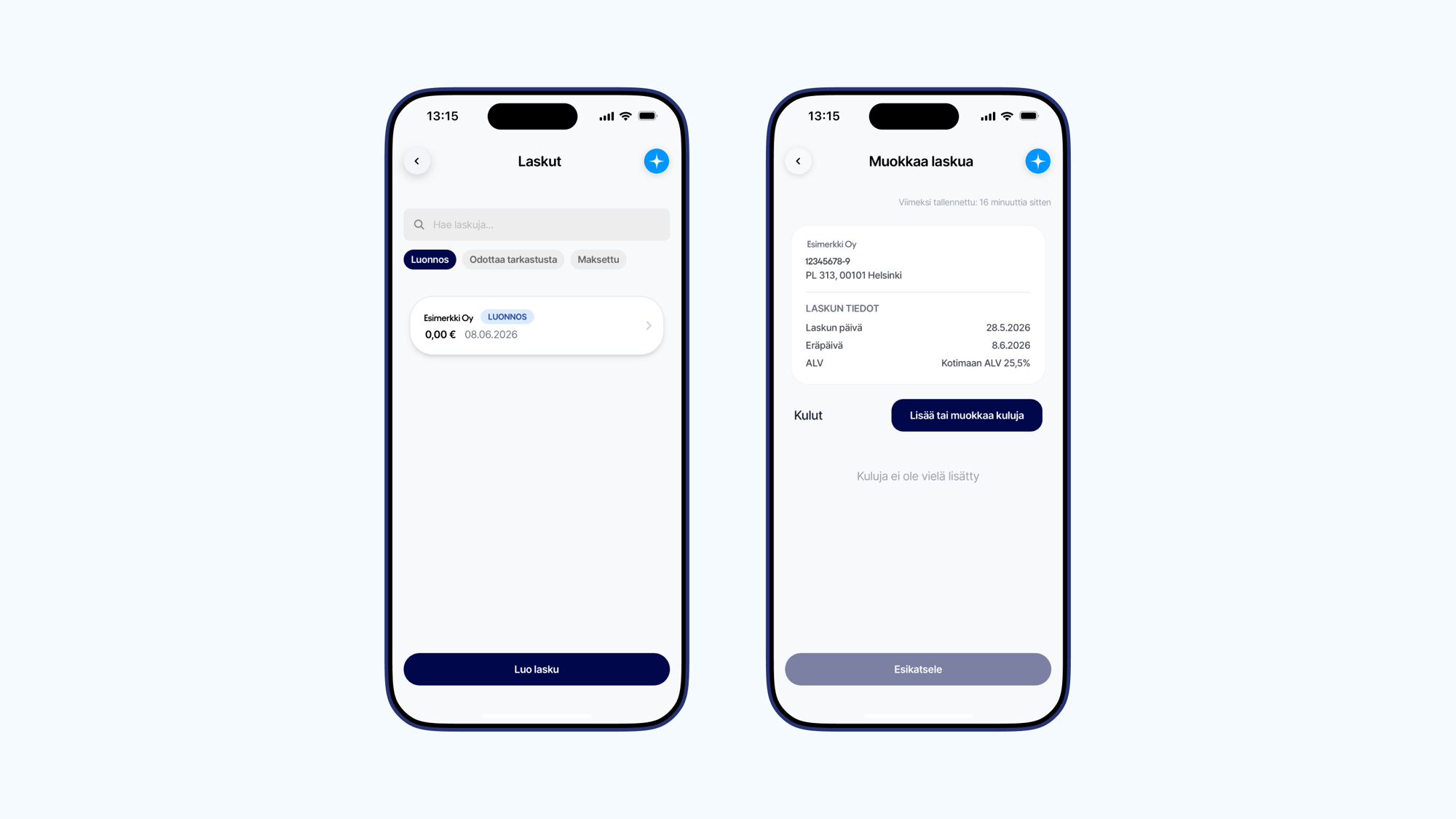
A draft invoice for adding expenses arising from a partner's gigs first appears in your profile with a sum of 0.00 €. Once we receive the invoicing data from the client, we automatically combine the fee information with the draft invoice details. An invoice with the total sum is created in your profile, and you can track its status through the app. This means you don't need to create or send invoices for these assignments yourself. How do I create an invoice for another assignment? If you also do other assignments for which you create your own invoices, you can easily create invoices directly in the Invoices section of the app. You can find more detailed instructions for creating other invoices here.
How do I add expenses as a light entrepreneur
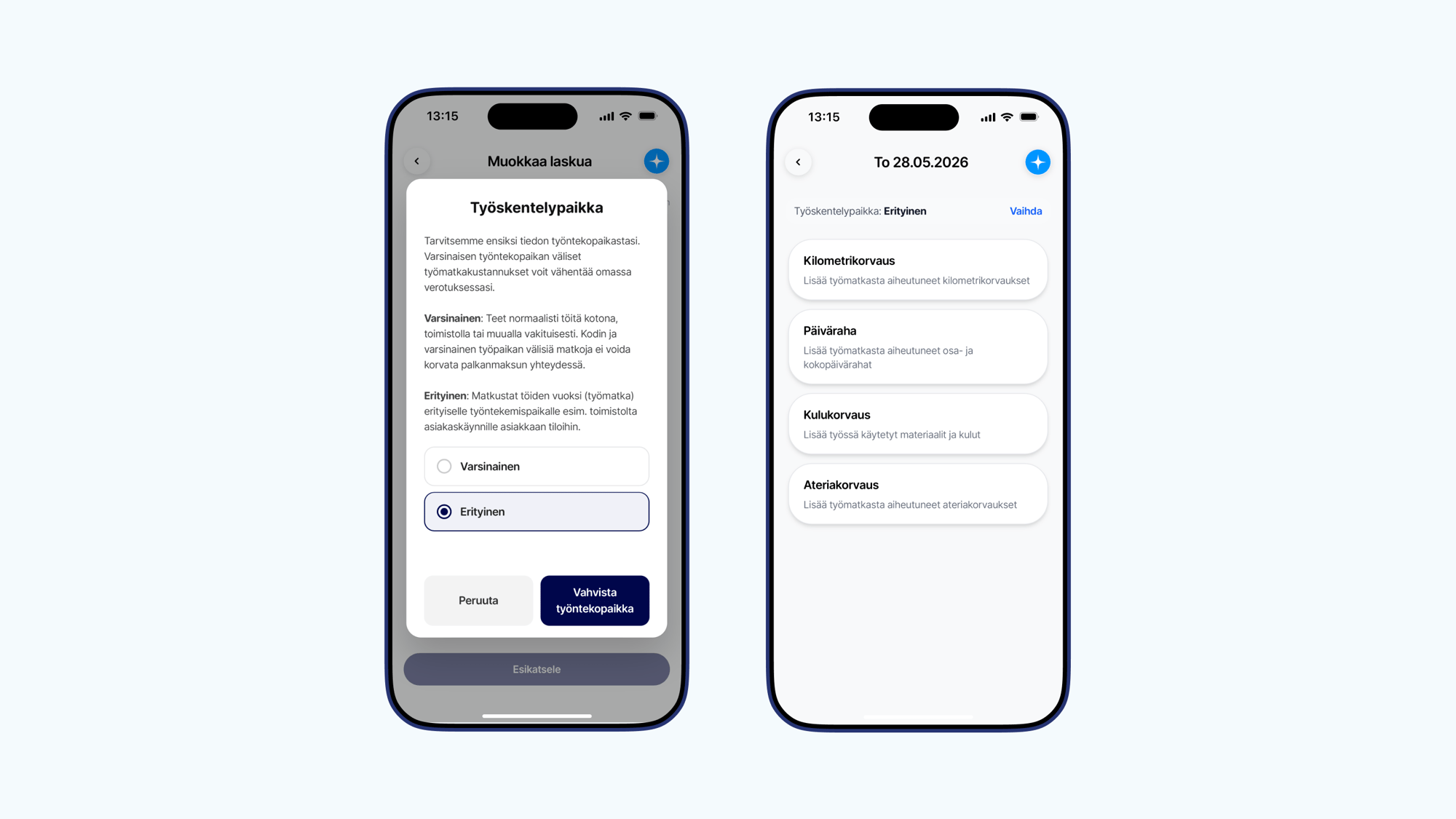
Truster creates invoices on your behalf based on information received from the client, meaning you don't need to create or send an invoice yourself. Your task is simply to add your own travel expenses and reimbursements to the ready draft invoice in your profile during the work period, if you want them to be tax-free when your fee is paid. By adding travel expenses to the draft invoice, you ensure that you receive the tax-free reimbursements you're entitled to immediately with your fee payment, meaning you'll have more money in hand! Expenses accounted for at the time of fee payment don't need to be reported separately to the Tax Administration. Please note that fuel, charging, or material costs cannot be added to the invoice as tax-deductible expenses when working as a light entrepreneur. You can add these to your own personal tax return as income-generating expenses instead. The video covers the following topics: • 1:45 Adding mileage allowances • 3:19 Adding per diems • 5:42 Adding expense reimbursements 1. Start from the invoice Open the Truster app and go to the Invoices section, to the draft invoice you want to add expenses to. Select Add row and then Add or edit expenses. 2. Select the workplace When adding expenses for completed gigs, set the workplace as Special. If you work permanently at the same location, such as at home or in an office, this is considered your actual workplace. In this case, trips between home and workplace are generally not reimbursed. Finally, check the expenses See the expense-specific instructions below. Once all expenses have been added, check the details and make sure all expenses are included. You don't need to send the invoice yourself, as we combine the expenses with the correct gig once we receive the invoicing data from the client.
What is light entrepreneurship
Light entrepreneurship is a form of work that allows a private individual to invoice for their own expertise without having their own Business ID or founding a company. A light entrepreneur finds their own clients and agrees on the content and price of the work, but invoicing is handled through an invoicing service. Light entrepreneurship is especially suitable for those who want to try entrepreneurial work easily and flexibly.
Adding a receipted expense reimbursement as a light entrepreneur
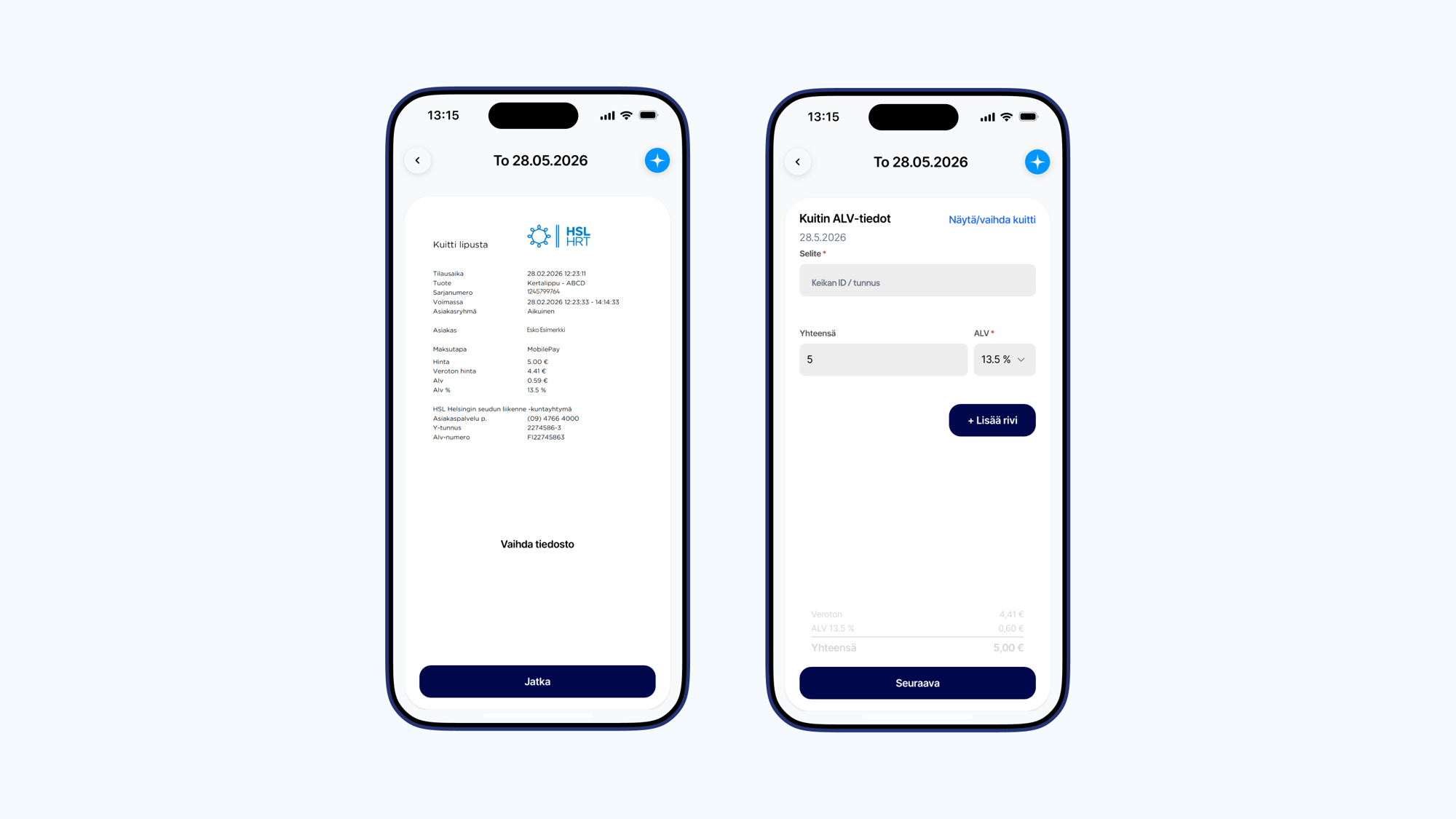
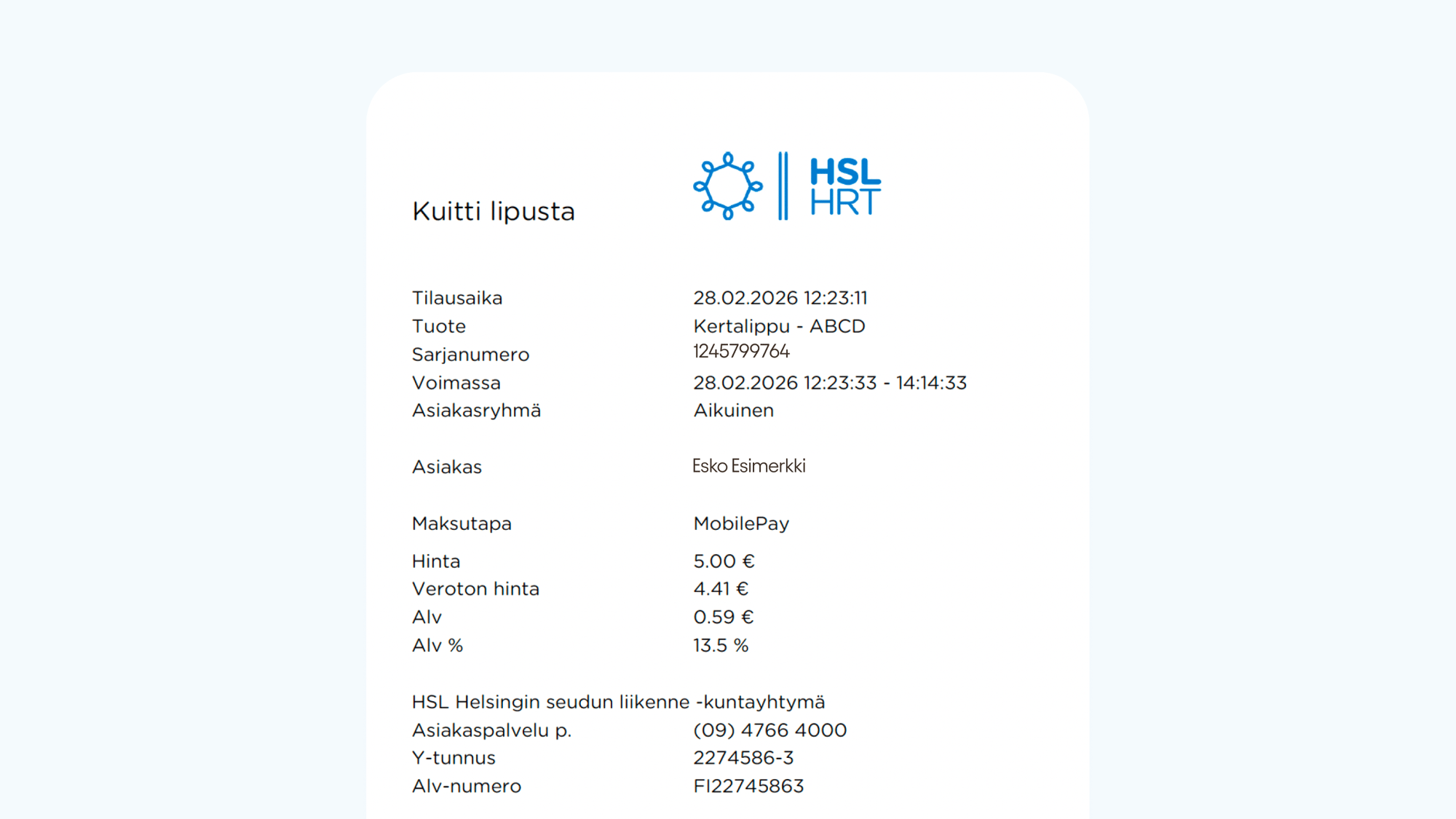
First, select the date you want to add an expense for. Then select Expense reimbursement. Add the receipt • take a photo of the receipt or upload a file • enter the amount of the expense • add the VAT details according to the receipt Domestic purchases: add the total amount and the VAT shown on the receipt Foreign purchases: add the amount in euros and VAT 0 % Add a description Add the gig ID/reference that the expense relates to in the expense description. Acceptable receipt Make sure you add an acceptable receipt to your deductions. An acceptable receipt includes: • seller's information (company name and Business ID) • price breakdown • amount of value-added tax • date
Adding a per diem as a light entrepreneur
If your trip entitles you to a per diem, select Per diem and fill in: • trip start and end time • destination address • transit addresses, if you changed location Add the gig ID/reference that the per diem relates to in the description. Please note that the home address in your profile is automatically used as the departure address, so you only need to add the destination address. Please make sure your home address is up to date in the My Information section.
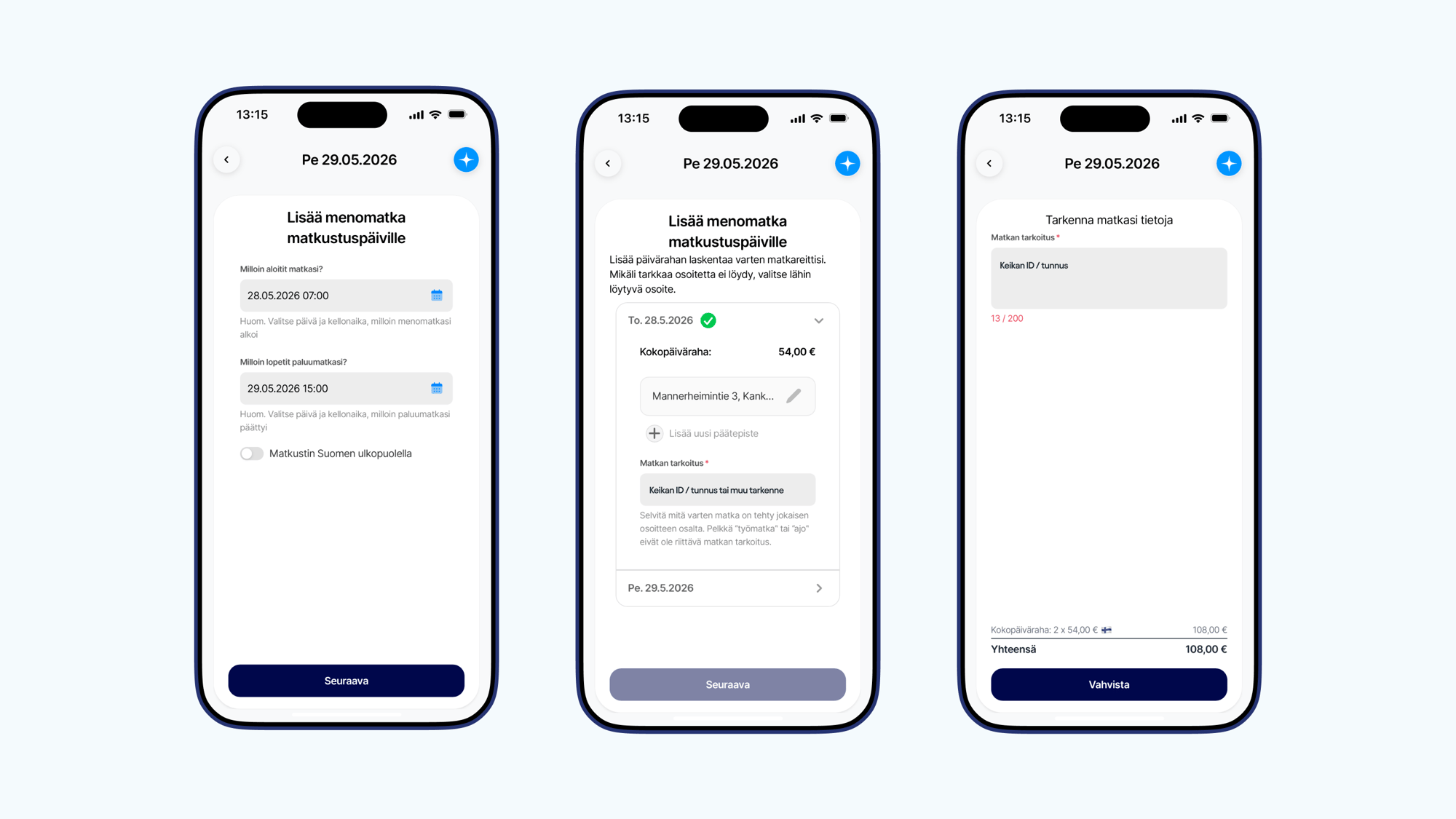
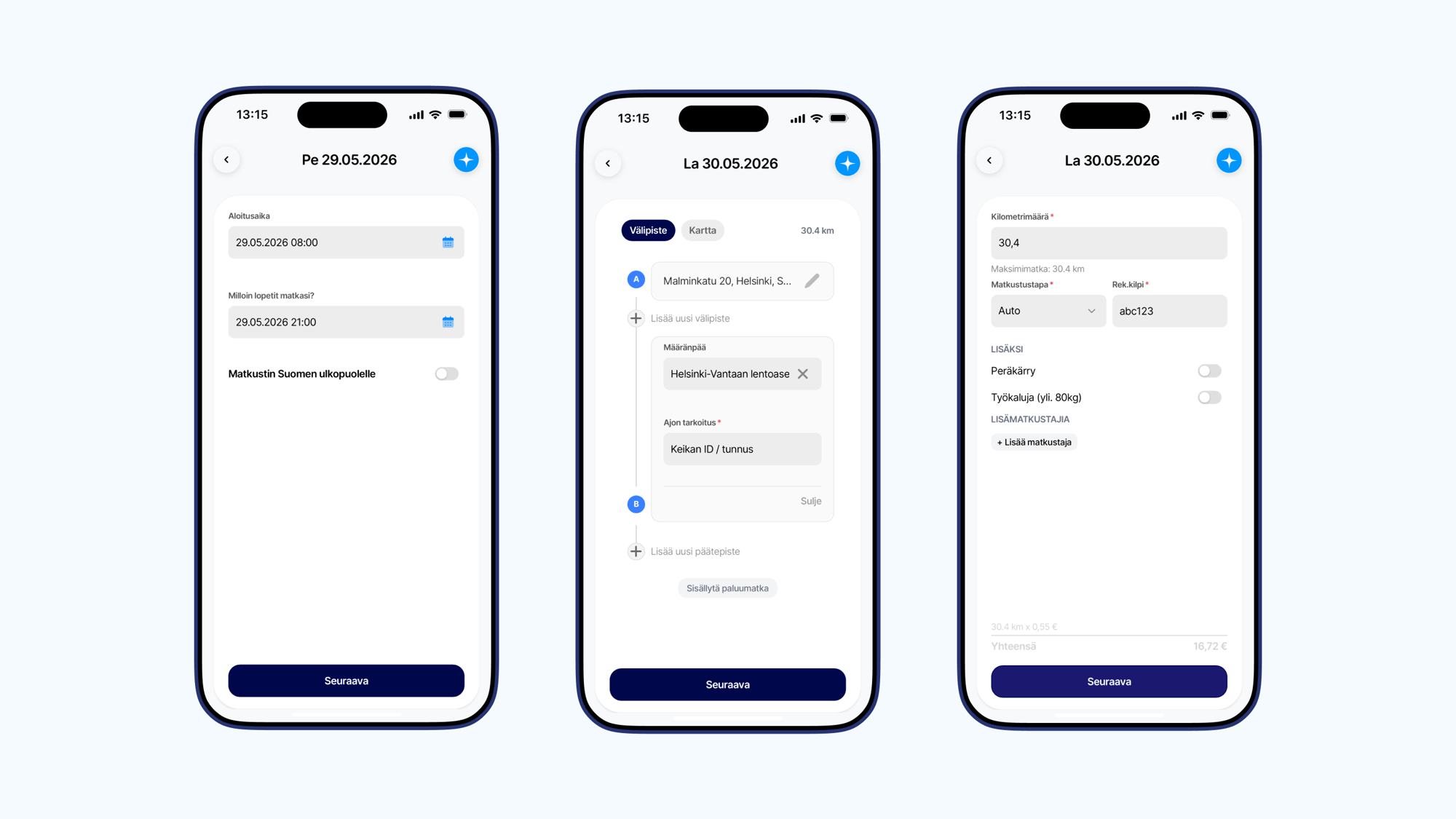
Adding a mileage allowance as a light entrepreneur
Select Mileage allowance and fill in: • start time • end time • departure address • destination • purpose of the trip (gig ID/reference) • vehicle information If the trip included several stops, add them to the route. If you returned to the starting point, select Include return trip. If traveling by car, also add the registration number.
How do I add expenses as a sole proprietor
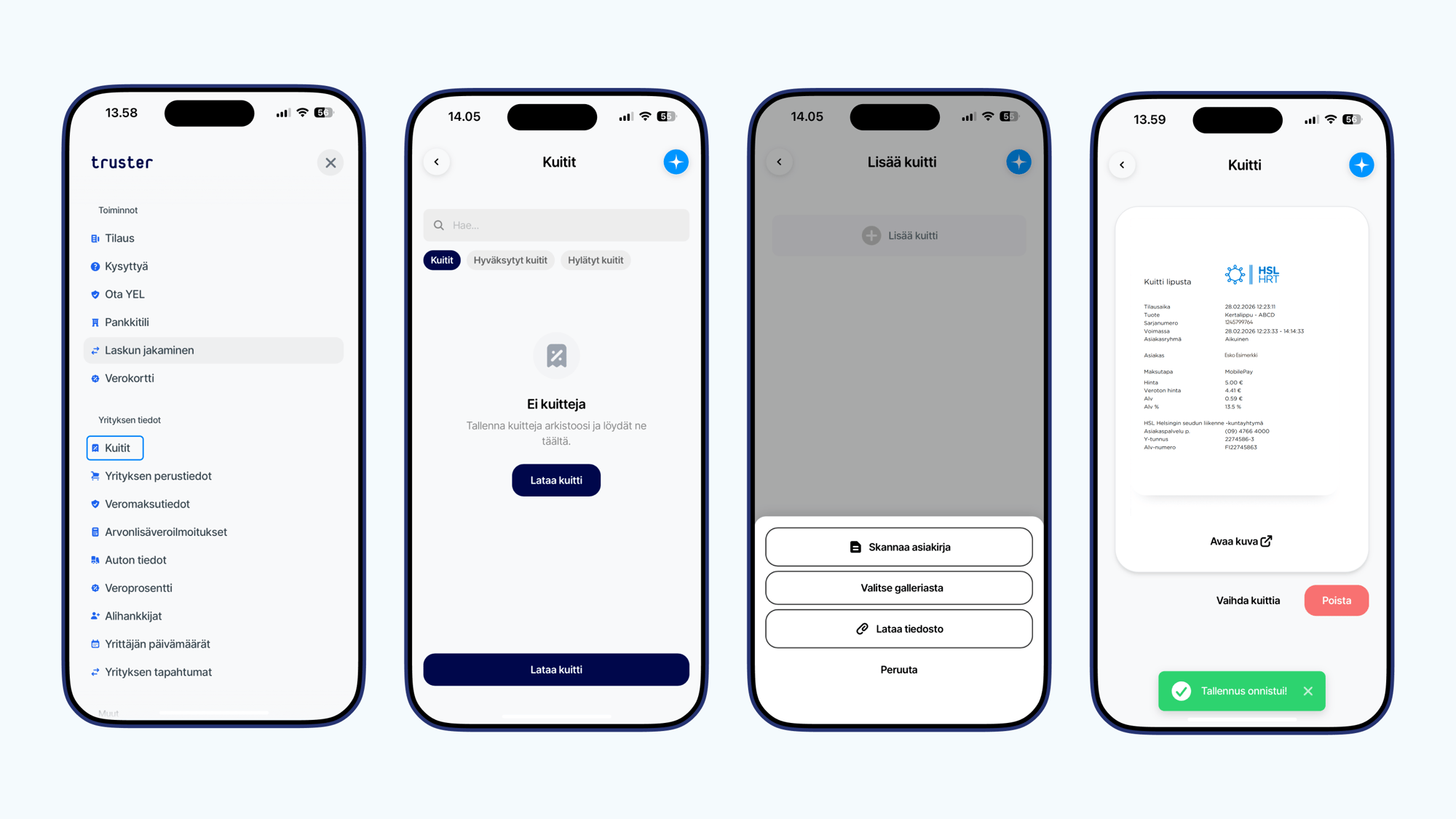
As a sole proprietor invoicer, you have access to a receipt scanner that makes documenting your company's expenses (such as materials, fuel and charging receipts, and travel expenses) quick and easy. You can upload electronic receipts through the receipt scanner and take a photo of a physical paper receipt. Always add only one receipt at a time — a single image cannot contain more than one receipt. Expenses can be added more freely than as a light entrepreneur, without needing to report them during a specific work period. However, we recommend adding expenses at least according to your VAT period, so they are always included in the correct VAT report. This way, you'll also receive VAT refunds on time! As a sole proprietor, expenses are therefore not processed when your fee is paid, but are instead accounted for annually in your tax return. Fuel and charging receipts related to transfer trips are treated as tax-deductible expenses, but fuel receipts accumulated from using your own vehicle are subject to restrictions depending on how much the vehicle is used for work.How our receipt scanner works • In the app, open the Menu and select Receipts • Click the Add receipt button • Choose whether you want to scan a receipt or take a photo • Upload a file from your device or take a photo, then save • If it's not clear from the receipt how it relates to your business activities, provide more details • Save After saving, the receipt is sent to us for internal review. All receipts are always checked so that appropriate receipts are approved before the VAT and tax return. There's no need to keep an eye on a receipt awaiting review. What kind of receipt is acceptable for bookkeeping? For a receipt to be accepted into bookkeeping, it must include the following information: • Seller's name, address, and Business ID • Purchase date • What was purchased • Purchase price (amount including and excluding tax) • VAT rate Why was my receipt rejected? Screenshot from online banking If you have uploaded a screenshot from your online banking through the receipt scanner, the receipt will be automatically rejected. Online banking payment information doesn't cover all the information mentioned above. The image doesn't show all the seller's information, the product, or the VAT rate. Always upload the original receipt or invoice. Incomplete information If a receipt is missing any of the information mentioned above, it cannot be accepted into bookkeeping. The most common reason is a missing product/service. A receipt may show the seller's information, purchase date, and amount, but if it doesn't show what product or service was purchased, it cannot reasonably be added as a company expense. Such receipts typically come from a payment terminal. Always upload the receipt that shows all the information mentioned above. Duplicate receipt A typical reason for rejection is a duplicate. The same receipt has already been accepted into your bookkeeping once before. Duplicates are automatically rejected. It's therefore important to upload the receipt as soon as possible after the purchase, or for example at regular intervals, so you don't create unnecessary work for yourself by uploading the same receipts through the scanner again.
What is sole proprietorship
A sole proprietorship has its own Business ID, under which invoices are sent. A sole proprietor is required to keep accounts and, depending on the situation, is also liable for value-added tax. Sole proprietorship is especially suitable for those who want to expand their business activities and deduct expenses more broadly in their taxation. The company's income is reported as business income, and a separate business tax return is filed for it. The tax return is combined with the personal tax return, and taxes are paid as advance taxes.
Pay in your account instantly
With Pikamaksu, your net pay is in your account as soon as the invoice has been paid.
Illustration: the user selects Pikamaksu, so the net pay is paid into their account immediately after the invoice is paid.
Ready to start invoicing your Bahn Express gigs?
Sign up and get started in minutes.